

Calman 6 Redesign Project
Portrait Displays, Inc.

Role
Solo UX/UI Designer
Timeline
2024-2026 (In progress)
Team
1 Designer + Small Engineering Team
Platform
Desktop (Windows/Mac)
Summary
Created a new desktop calibration workflow designed to dramatically simplify the calibration process that was previously complex and required expert-level knowledge. The new application saves time, reduces the number of steps, and increases calibration accuracy.
Background
Background: Calman 5 was an expert-focused product with Outdated UI and overly complex workflows. Home users wanted better picture quality but could not navigate the dozens of specialized steps.
Primary Problem: Home users struggle to achieve accurate display calibration due to Calman 5’s complexity and expert-focused workflows. A single missed step could drastically alter a calibration.
Business Goal: Expand reach into the growing home-user market.
User Goal: Calibrate a display with minimal effort.
Problem Statement
Calman 5’s user interface and workflow structure evolved incrementally in response to user and manufacturer needs, resulting in inconsistent patterns across products and workflows. These inconsistencies increased cognitive load, as users were required to navigate numerous manual steps and mentally re-learn workflows when calibrating different devices. Over time, this fragmentation reduced usability and made the calibration process more difficult than necessary.
Audience & Constraints
Target Users
Home users—individuals wanting excellent picture quality without technical knowledge.
Constraints
Limited resources—Sole UX/UI Designer and a small engineering team focused on high-impact project decisions.
Tradeoffs
To make the application approachable for home users and less-experienced calibrators, the core workflow intentionally limits access to expert-level controls. These controls are not removed, but deliberately de-emphasized or hidden to reduce cognitive load and streamline the primary experience. This tradeoff allows new users to achieve successful results with minimal effort, while still preserving flexibility for advanced users elsewhere in the product.
Design Strategy
Before
Calibration required users to manually orchestrate a long, error-prone sequence of steps for each individual picture mode. Users had to connect hardware, configure device settings, capture pre-calibration measurements, reset the display, and then sequentially adjust luminance, white balance, multipoint grayscale, and either a 3D LUT or Color Management System (CMS), followed by post-calibration validation. This entire process had to be repeated from scratch for every mode (e.g., SDR Cinema, HDR, Dolby Vision), resulting in high cognitive load, long setup times, and frequent opportunities for mistakes.
After (Proposed)
Calibration is reduced to a single guided flow. Users select their connected devices, choose the picture modes they want to calibrate (e.g., SDR Cinema, HDR Filmmaker Mode, Dolby Vision Game), confirm targets, and initiate calibration. The Automated Calibration Assistant then executes the full process end-to-end, handling all required measurements and adjustments across selected modes without further user intervention.
Interaction & Visual Design
Non-Blocking UI
The Non-Blocking UI allows users to navigate freely even during calibration and access past reports anytime, fostering trust and transparency. This sets itself apart from the previous designs where the UI is locked while performing any calibration or measurement.
Interactive Visualization
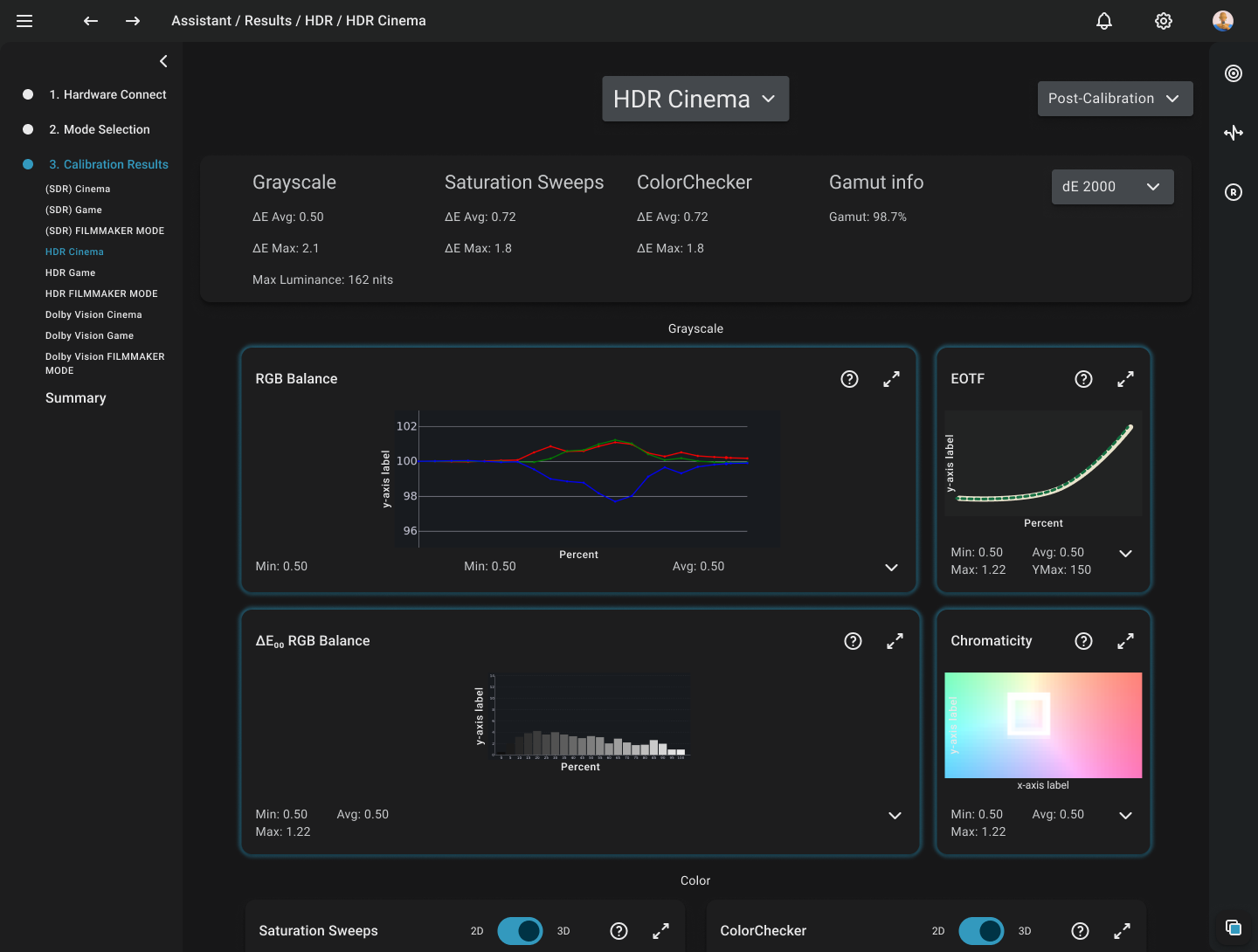
- Users can rotate, zoom, and inspect calibration data using modern visualization interaction patterns, replacing static tables with interactive data visualization.
- Users can rotate, zoom, and inspect calibration data using modern interaction patterns.
Outcome & Impact
Status: In Development with ongoing internal validation.
Success Metrics
- Success Metrics: user adoption of automated flow
- Calibration quality (dE) improvements
Future Vision
Integrate feedback for Objective improvement post-launch and continue expanding future user-driven enhancements within the application.
Disclaimer: Some details have been omitted or changed to protect confidential information.
Calman 6 Redesign Project
Portrait Displays, Inc.

Role
Solo UX/UI Designer
Timeline
2024-2026 (In progress)
Team
1 Designer + Small Engineering Team
Platform
Desktop (Windows/Mac)
Summary
Created a new desktop calibration workflow designed to dramatically simplify the calibration process that was previously complex and required expert-level knowledge. The new application saves time, reduces the number of steps, and increases calibration accuracy.
Background
Background: Calman 5 was an expert-focused product with Outdated UI and overly complex workflows. Home users wanted better picture quality but could not navigate the dozens of specialized steps.
Primary Problem: Home users struggle to achieve accurate display calibration due to Calman 5’s complexity and expert-focused workflows. A single missed step could drastically alter a calibration.
Business Goal: Expand reach into the growing home-user market.
User Goal: Calibrate a display with minimal effort.
Problem Statement
Calman 5’s user interface and workflow structure evolved incrementally in response to user and manufacturer needs, resulting in inconsistent patterns across products and workflows. These inconsistencies increased cognitive load, as users were required to navigate numerous manual steps and mentally re-learn workflows when calibrating different devices. Over time, this fragmentation reduced usability and made the calibration process more difficult than necessary.
Audience & Constraints
Target Users
Home users—individuals wanting excellent picture quality without technical knowledge.
Constraints
Limited resources—Sole UX/UI Designer and a small engineering team focused on high-impact project decisions.
Tradeoffs
To make the application approachable for home users and less-experienced calibrators, the core workflow intentionally limits access to expert-level controls. These controls are not removed, but deliberately de-emphasized or hidden to reduce cognitive load and streamline the primary experience. This tradeoff allows new users to achieve successful results with minimal effort, while still preserving flexibility for advanced users elsewhere in the product.
Design Strategy
Before
Calibration required users to manually orchestrate a long, error-prone sequence of steps for each individual picture mode. Users had to connect hardware, configure device settings, capture pre-calibration measurements, reset the display, and then sequentially adjust luminance, white balance, multipoint grayscale, and either a 3D LUT or Color Management System (CMS), followed by post-calibration validation. This entire process had to be repeated from scratch for every mode (e.g., SDR Cinema, HDR, Dolby Vision), resulting in high cognitive load, long setup times, and frequent opportunities for mistakes.
After (Proposed)
Calibration is reduced to a single guided flow. Users select their connected devices, choose the picture modes they want to calibrate (e.g., SDR Cinema, HDR Filmmaker Mode, Dolby Vision Game), confirm targets, and initiate calibration. The Automated Calibration Assistant then executes the full process end-to-end, handling all required measurements and adjustments across selected modes without further user intervention.
Interaction & Visual Design
Non-Blocking UI
The Non-Blocking UI allows users to navigate freely even during calibration and access past reports anytime, fostering trust and transparency. This sets itself apart from the previous designs where the UI is locked while performing any calibration or measurement.
Interactive Visualization
- Users can rotate, zoom, and inspect calibration data using modern visualization interaction patterns, replacing static tables with interactive data visualization.
- Users can rotate, zoom, and inspect calibration data using modern interaction patterns.
Outcome & Impact
Status: In Development with ongoing internal validation.
Success Metrics
- Success Metrics: user adoption of automated flow
- Calibration quality (dE) improvements
Future Vision
Integrate feedback for Objective improvement post-launch and continue expanding future user-driven enhancements within the application.
Disclaimer: Some details have been omitted or changed to protect confidential information.
Calman 6 Redesign Project
Portrait Displays, Inc.

Role
Solo UX/UI Designer
Timeline
2024-2026 (In progress)
Team
1 Designer + Small Engineering Team
Platform
Desktop (Windows/Mac)
Summary
Created a new desktop calibration workflow designed to dramatically simplify the calibration process that was previously complex and required expert-level knowledge. The new application saves time, reduces the number of steps, and increases calibration accuracy.
Background
Background: Calman 5 was an expert-focused product with Outdated UI and overly complex workflows. Home users wanted better picture quality but could not navigate the dozens of specialized steps.
Primary Problem: Home users struggle to achieve accurate display calibration due to Calman 5’s complexity and expert-focused workflows. A single missed step could drastically alter a calibration.
Business Goal: Expand reach into the growing home-user market.
User Goal: Calibrate a display with minimal effort.
Problem Statement
Calman 5’s user interface and workflow structure evolved incrementally in response to user and manufacturer needs, resulting in inconsistent patterns across products and workflows. These inconsistencies increased cognitive load, as users were required to navigate numerous manual steps and mentally re-learn workflows when calibrating different devices. Over time, this fragmentation reduced usability and made the calibration process more difficult than necessary.
Audience & Constraints
Target Users
Home users—individuals wanting excellent picture quality without technical knowledge.
Constraints
Limited resources—Sole UX/UI Designer and a small engineering team focused on high-impact project decisions.
Tradeoffs
To make the application approachable for home users and less-experienced calibrators, the core workflow intentionally limits access to expert-level controls. These controls are not removed, but deliberately de-emphasized or hidden to reduce cognitive load and streamline the primary experience. This tradeoff allows new users to achieve successful results with minimal effort, while still preserving flexibility for advanced users elsewhere in the product.
Design Strategy
Before
Calibration required users to manually orchestrate a long, error-prone sequence of steps for each individual picture mode. Users had to connect hardware, configure device settings, capture pre-calibration measurements, reset the display, and then sequentially adjust luminance, white balance, multipoint grayscale, and either a 3D LUT or Color Management System (CMS), followed by post-calibration validation. This entire process had to be repeated from scratch for every mode (e.g., SDR Cinema, HDR, Dolby Vision), resulting in high cognitive load, long setup times, and frequent opportunities for mistakes.
After (Proposed)
Calibration is reduced to a single guided flow. Users select their connected devices, choose the picture modes they want to calibrate (e.g., SDR Cinema, HDR Filmmaker Mode, Dolby Vision Game), confirm targets, and initiate calibration. The Automated Calibration Assistant then executes the full process end-to-end, handling all required measurements and adjustments across selected modes without further user intervention.
Interaction & Visual Design
Non-Blocking UI
The Non-Blocking UI allows users to navigate freely even during calibration and access past reports anytime, fostering trust and transparency. This sets itself apart from the previous designs where the UI is locked while performing any calibration or measurement.
Interactive Visualization
- Users can rotate, zoom, and inspect calibration data using modern visualization interaction patterns, replacing static tables with interactive data visualization.
- Users can rotate, zoom, and inspect calibration data using modern interaction patterns.
Outcome & Impact
Status: In Development with ongoing internal validation.
Success Metrics
- Success Metrics: user adoption of automated flow
- Calibration quality (dE) improvements
Future Vision
Integrate feedback for Objective improvement post-launch and continue expanding future user-driven enhancements within the application.
Disclaimer: Some details have been omitted or changed to protect confidential information.