

Calman 5 Makeover
Portrait Displays, Inc.
Before
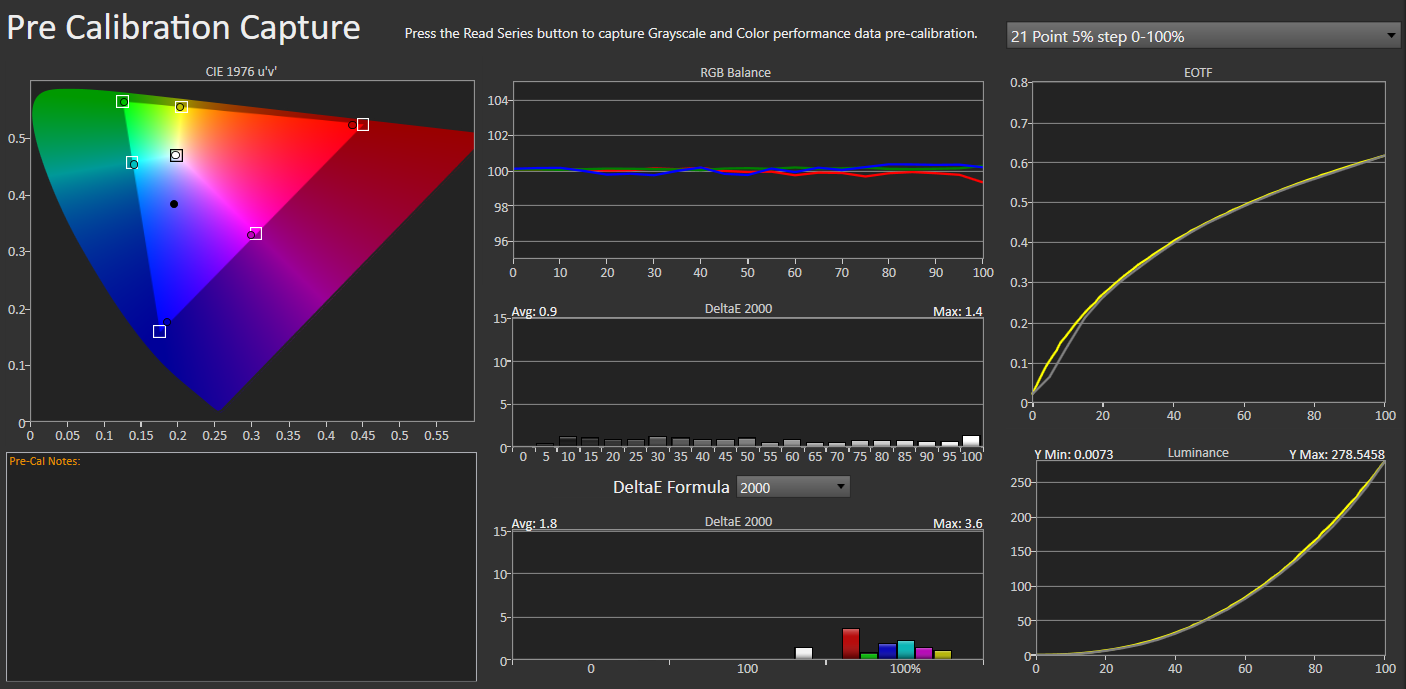
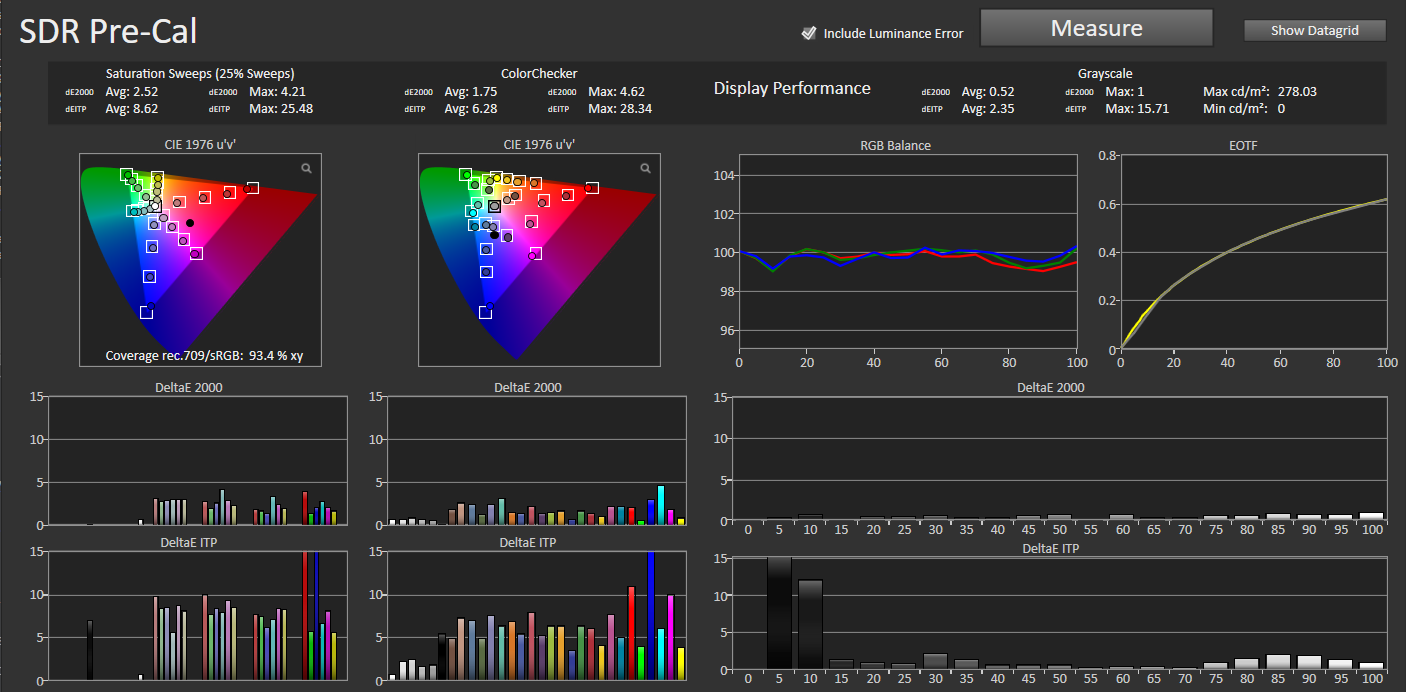
After

Role
Workflow Designer
Timeline
3 Months
Team
Solo Project
Platform
Calman 5 Software
Summary
Provided a “facelift” to the currently shipping Calman 5 projects. The goal was to create consistency across products, increase success rate amongst users using Calman 5, and usability.
Background
Calman 5 was built by necessity. There are two lines of business this makeover entails. Home and Business. Both haven’t been touched in years and when they are touched, it is simply to add in features that are required by newer displays. With the creation of Calman 6, the idea was to give these workflows one last update that would hold over users until they were finally able to migrate to the newer application. Additionally, since most engineering work would be utilized by the new application, we were hoping to update and leave alone until we retired the old application.
Problem Statement
Calman 5’s user interface and workflow structure evolved incrementally in response to user and manufacturer needs, resulting in inconsistent patterns across products and workflows. These inconsistencies increased cognitive load, as users were required to navigate numerous manual steps and mentally re-learn workflows when calibrating different devices. Over time, this fragmentation reduced usability and made the calibration process more difficult than necessary.
Goals
User Goals
To calibrate their displays and have confidence in the accuracy of the results.
Business Goals
- Update workflows to create a unified look and feel for users.
- Provide just enough “newness” to hold users over until the release of Calman 6.
Audience & Constraints
Target Users
Professional calibrators, home enthusiasts, and production studios
Feedback Constraints
Direct access to end users was limited; feedback primarily surfaced through support channels when issues occurred. Design decisions were informed by patterns in customer complaints, support tickets, and QA findings.
Platform
Constraints
- Fixed layout and component limitations within Calman 5’s design environment
- Workflow logic defined by a proprietary pseudo-coding system
- Inability to introduce new UI components or interactions
- Requirement to maintain compatibility across existing manufacturer workflows
Design Strategy
Approach
- Consistency over customization
- Systemization over on-off fixes
- Automate where feasible to reduce repetitive or procedural tasks
- Systemization with reusable templates
Solution
Reusable Workflow Template
- The template standardized the flow of the workflows. Users can open a workflow and expect the same navigational layouts within it.
- Workflows were created directly from the template.
Centralized Logic & Configuration
- A configuration page was created for engineers to easily edit targets and various aspects of the calibration process.
- Having the template meant that the creation of any new workflows takes minutes instead of days to complete.
- Any updates to workflows became easy as the structure was standardized and engineers now know where and how to update instead of searching throughout the workflow for a specific action.
Tradeoffs
Customization vs consistency
Standardizing experiences at the expense of per-product uniqueness.
Speed vs transparency
Calibrations now take a bit longer because there are now more measurements. However, this provides a more accurate analysis of the display when prior workflows may have hid flaws in the display accuracy.
Outcomes & Impacts
- The calibration process became cleaner and more concise.
- The template format lead to easier maintenance and faster workflow creation.
- From Customer Support and R&D, the updated template which included more datapoints became much more useful to diagnose issues with a calibration.
- There is a desire to perform more usability testing after releases to aid in design.
Key Takeaways
As new workflows were built, each one revealed opportunities to improve the underlying template. This feedback loop transformed the work from a finite project into an ongoing, iterative system.
Disclaimer: Some details have been modified or omitted to protect confidential information.
Calman 5 Makeover
Portrait Displays, Inc.
Before
After

Role
Workflow Designer
Timeline
3 Months
Team
Solo Project
Platform
Calman 5 Software
Summary
Provided a “facelift” to the currently shipping Calman 5 projects. The goal was to create consistency across products, increase success rate amongst users using Calman 5, and usability.
Background
Calman 5 was built by necessity. There are two lines of business this makeover entails. Home and Business. Both haven’t been touched in years and when they are touched, it is simply to add in features that are required by newer displays. With the creation of Calman 6, the idea was to give these workflows one last update that would hold over users until they were finally able to migrate to the newer application. Additionally, since most engineering work would be utilized by the new application, we were hoping to update and leave alone until we retired the old application.
Problem Statement
Calman 5’s user interface and workflow structure evolved incrementally in response to user and manufacturer needs, resulting in inconsistent patterns across products and workflows. These inconsistencies increased cognitive load, as users were required to navigate numerous manual steps and mentally re-learn workflows when calibrating different devices. Over time, this fragmentation reduced usability and made the calibration process more difficult than necessary.
Goals
User Goals
To calibrate their displays and have confidence in the accuracy of the results.
Business Goals
- Update workflows to create a unified look and feel for users.
- Provide just enough “newness” to hold users over until the release of Calman 6.
Audience & Constraints
Target Users
Professional calibrators, home enthusiasts, and production studios
Feedback Constraints
Direct access to end users was limited; feedback primarily surfaced through support channels when issues occurred. Design decisions were informed by patterns in customer complaints, support tickets, and QA findings.
Platform Constraints
- Fixed layout and component limitations within Calman 5’s design environment
- Workflow logic defined by a proprietary pseudo-coding system
- Inability to introduce new UI components or interactions
- Requirement to maintain compatibility across existing manufacturer workflows
Design Strategy
Approach
- Consistency over customization
- Systemization over on-off fixes
- Automate where feasible to reduce repetitive or procedural tasks
- Systemization with reusable templates
Solution
Reusable Workflow Template
- The template standardized the flow of the workflows. Users can open a workflow and expect the same navigational layouts within it.
- Workflows were created directly from the template.
Centralized Logic & Configuration
- A configuration page was created for engineers to easily edit targets and various aspects of the calibration process.
- Having the template meant that the creation of any new workflows takes minutes instead of days to complete.
- Any updates to workflows became easy as the structure was standardized and engineers now know where and how to update instead of searching throughout the workflow for a specific action.
Tradeoffs
Customization vs consistency
Standardizing experiences at the expense of per-product uniqueness.
Speed vs transparency
Calibrations now take a bit longer because there are now more measurements. However, this provides a more accurate analysis of the display when prior workflows may have hid flaws in the display accuracy.
Outcomes & Impacts
- The calibration process became cleaner and more concise.
- The template format lead to easier maintenance and faster workflow creation.
- From Customer Support and R&D, the updated template which included more datapoints became much more useful to diagnose issues with a calibration.
- There is a desire to perform more usability testing after releases to aid in design.
Key Takeaways
As new workflows were built, each one revealed opportunities to improve the underlying template. This feedback loop transformed the work from a finite project into an ongoing, iterative system.
Disclaimer: Some details have been modified or omitted to protect confidential information.
Calman 5 Makeover
Portrait Displays, Inc.
Before
After

Role
Workflow Designer
Timeline
3 Months
Team
Solo Project
Platform
Calman 5 Software
Summary
Provided a “facelift” to the currently shipping Calman 5 projects. The goal was to create consistency across products, increase success rate amongst users using Calman 5, and usability.
Background
Calman 5 was built by necessity. There are two lines of business this makeover entails. Home and Business. Both haven’t been touched in years and when they are touched, it is simply to add in features that are required by newer displays. With the creation of Calman 6, the idea was to give these workflows one last update that would hold over users until they were finally able to migrate to the newer application. Additionally, since most engineering work would be utilized by the new application, we were hoping to update and leave alone until we retired the old application.
Problem Statement
Calman 5’s user interface and workflow structure evolved incrementally in response to user and manufacturer needs, resulting in inconsistent patterns across products and workflows. These inconsistencies increased cognitive load, as users were required to navigate numerous manual steps and mentally re-learn workflows when calibrating different devices. Over time, this fragmentation reduced usability and made the calibration process more difficult than necessary.
Goals
User Goals
To calibrate their displays and have confidence in the accuracy of the results.
Business Goals
- Update workflows to create a unified look and feel for users.
- Provide just enough “newness” to hold users over until the release of Calman 6.
Audience & Constraints
Target Users
Professional calibrators, home enthusiasts, and production studios
Feedback Constraints
Direct access to end users was limited; feedback primarily surfaced through support channels when issues occurred. Design decisions were informed by patterns in customer complaints, support tickets, and QA findings.
Platform Constraints
- Fixed layout and component limitations within Calman 5’s design environment
- Workflow logic defined by a proprietary pseudo-coding system
- Inability to introduce new UI components or interactions
- Requirement to maintain compatibility across existing manufacturer workflows
Design Strategy
Approach
- Consistency over customization
- Systemization over on-off fixes
- Automate where feasible to reduce repetitive or procedural tasks
- Systemization with reusable templates
Solution
Reusable Workflow Template
- The template standardized the flow of the workflows. Users can open a workflow and expect the same navigational layouts within it.
- Workflows were created directly from the template.
Centralized Logic & Configuration
- A configuration page was created for engineers to easily edit targets and various aspects of the calibration process.
- Having the template meant that the creation of any new workflows takes minutes instead of days to complete.
- Any updates to workflows became easy as the structure was standardized and engineers now know where and how to update instead of searching throughout the workflow for a specific action.
Tradeoffs
Customization vs consistency
Standardizing experiences at the expense of per-product uniqueness.
Speed vs transparency
Calibrations now take a bit longer because there are now more measurements. However, this provides a more accurate analysis of the display when prior workflows may have hid flaws in the display accuracy.
Outcomes & Impacts
- The calibration process became cleaner and more concise.
- The template format lead to easier maintenance and faster workflow creation.
- From Customer Support and R&D, the updated template which included more datapoints became much more useful to diagnose issues with a calibration.
- There is a desire to perform more usability testing after releases to aid in design.
Key Takeaways
As new workflows were built, each one revealed opportunities to improve the underlying template. This feedback loop transformed the work from a finite project into an ongoing, iterative system.
Disclaimer: Some details have been modified or omitted to protect confidential information.